
Will you know if someone has blocked you on WhatsApp? This guide explains the usual clues and, just as important, why you should look at several signs together instead of trusting only one.
But have you experienced your messages to your friend did not get any reply for a very long time or when your girlfriend or boyfriend is “angry” with you and all of your messages sent out but none of them is seen or delivered. You may wonder what if they are blocking you from their contact list, but is that a way for you to find out?
Article below will tell you some of the clues to find out if a person is blocking you from their WhatsApp:
How Do I know If Someone Blocked Me on WhatsApp?
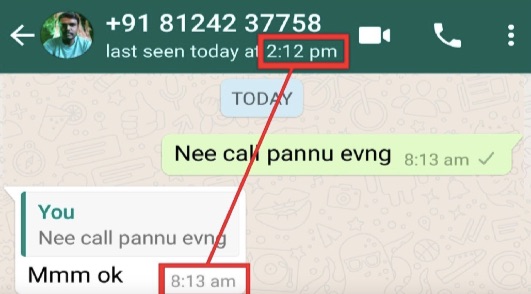
Technique of “Last Seen”
“Last seen” shows when a contact was last active on WhatsApp. If that status suddenly disappears, it can be one clue, but it is not proof by itself because people can also hide last-seen information in their privacy settings without blocking you.
last seen whatsapp
Look for Updates to Their Profile
If someone blocks you from their contact list, most likely you will not see their profile update for a long time. But users may not change their profile photo regularly, it is not 100% for sure if the profile photo not update for a long time means the person is blocking you. You may also combine with other clues from this article, it will help you to identify whether the person is blocking you or not.

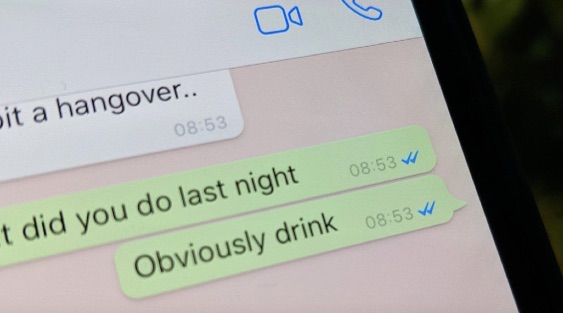
Check the Checkmarks
Checkmarks under your messages are another clue. One checkmark means the message was sent, while two usually mean it reached the recipient's phone. If messages stay on a single checkmark for a long time, blocking is one possible reason, but poor signal, phone shutdown, or a long offline period can create the same result.
check whatsapp checkmarks
Send Messages
‘Blue tick’ under the message you sent in WhatsApp let you know if someone has already seen your message, and this is one of the clue for you to determine whether you are blocked by someone on WhatsApp. If your messages sent for a long time and never read by the person, it is high chance that the person is blocking you. But if the contact person is in offline over the night which will also result your message not being seen. By combined with other clues from this article, you may identify if the user is blocking you.
Make a Call
To check if someone is blocking you from their contact list on WhatsApp, you can try to make a call to them. WhatsApp will notify the user if someone is making a call, but if the user has blocked you, they will never receive the WhatsApp call notification, and your call will never reach to them, but this cannot be sure if the person is really blocking you, sometimes people are just not aware of your call at that moment. You can try to call for few more times before jumping to the conclusion.
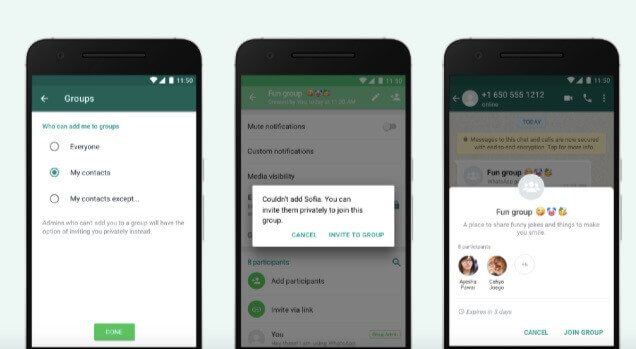
Check the Participants List in a Group Message
Another way of verifying if the user is blocking you on WhatsApp is by adding them to a WhatsApp group. You can try to create a group chat and add the user to the group. WhatsApp will not allow user to add participants into chart group if the user has blocked you from their side and you will receive “Can’t add participant” error when adding them into group chart, but the contact will remain in your participants list.
add group chat
We are unable to prevent if someone wants to block you on WhatsApp, but at least we are able to observe from some clues or hints to know if someone has blocked you on WhatsApp. The advice for you is to cross check with different application where connecting both of you, like Facebook Messenger or iMessage. In most cases, if someone blocks you on WhatsApp, they will also block you on other application platform as well. Life goes on, and try to let go the past and move on to have a better life with your loved ones.
